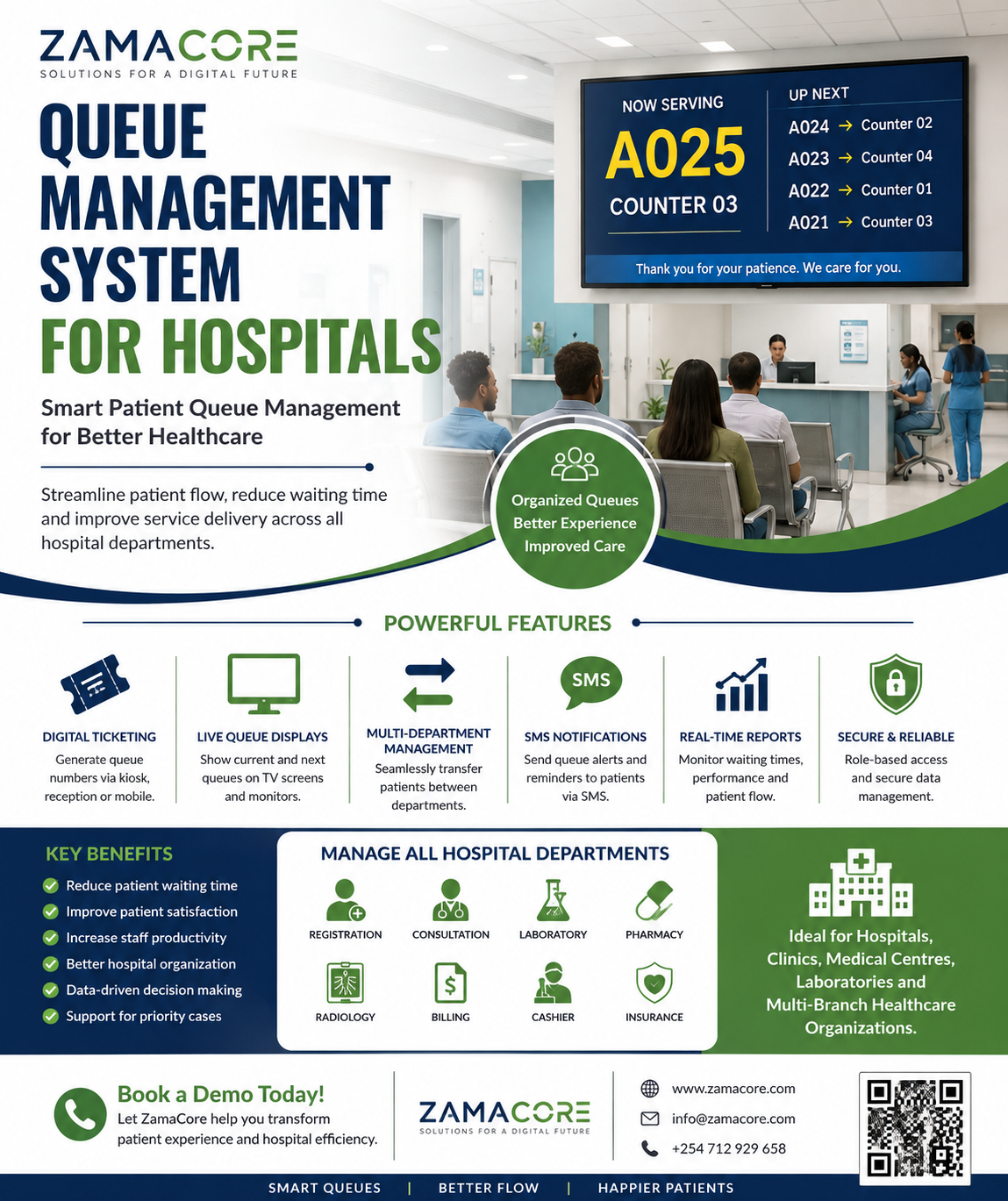
Hospitals and healthcare facilities handle hundreds or even thousands of patients every day. From registration and consultation to laboratory testing, pharmacy services, billing, radiology, and specialist clinics, patients may need to move through several service points before completing their visit.
Without an effective Queue Management System for Hospitals, these processes can quickly become disorganized. Patients may wait for long periods without knowing when they will be served, hospital staff may struggle to determine who should be attended to next, and management may lack accurate information about waiting times, patient flow, and departmental performance.
A modern Hospital Queue Management System provides healthcare facilities with a structured and automated way of managing patient queues from arrival to completion of service.
At ZamaCore, we provide customizable Queue Management Systems for hospitals, clinics, medical centres, laboratories, pharmacies, diagnostic centres, and other healthcare organizations that need to improve patient flow, reduce congestion, and create a more organized patient experience.
Whether you manage a small private clinic or a large multi-department hospital, a digital queue management solution can transform the way patients move through your facility.
What Is a Queue Management System for Hospitals?
A Queue Management System for Hospitals is a digital solution that organizes, monitors, and controls the movement of patients through different hospital departments.
Instead of patients forming physical lines or repeatedly asking staff when they will be served, the system assigns each patient a queue number or digital ticket and directs them to the appropriate service point.
The system may display information through:
- Digital queue screens
- Television displays
- Reception computers
- Tablets
- Mobile devices
- Counter displays
- Public announcement systems
- SMS notifications
- Web applications
Patients can therefore understand where they are in the queue while healthcare workers can easily call the next patient.
Hospital administrators can also monitor queue performance across departments.
A patient may, for example, follow this journey:
Registration → Triage → Doctor Consultation → Laboratory → Pharmacy → Billing
Instead of manually managing every stage, the hospital queue management software can automatically coordinate the patient’s movement between departments.
Why Hospitals Need a Queue Management System
Managing patient queues manually may work when a facility serves a very small number of patients.
However, as patient numbers increase, manual queues become difficult to control.
Common challenges include:
- Long patient waiting times
- Congested reception areas
- Patients standing in unnecessary lines
- Confusion about who arrived first
- Patients moving to the wrong department
- Queue jumping
- Disputes between patients
- Overworked reception staff
- Poor coordination between departments
- Difficulty prioritizing emergency or special cases
- Lack of accurate waiting-time information
- Limited visibility for hospital management
- Poor patient experience
A Hospital Queue Management System introduces structure into these processes.
Instead of depending entirely on staff to organize queues manually, technology helps manage patient flow automatically.
How a Hospital Queue Management System Works
The exact workflow depends on the hospital, but a typical system works in several stages.
1. Patient Arrives at the Hospital
When a patient arrives, they can register through:
- Reception
- Self-service kiosk
- Mobile application
- Web portal
- Appointment system
- Hospital Management System integration
Existing patients can be identified using their patient number, phone number, national identification details, insurance details, or another identifier configured by the hospital.
2. Patient Selects the Required Service
The patient or receptionist chooses the service required.
Examples include:
- General consultation
- Dental clinic
- Eye clinic
- Paediatric clinic
- Maternity
- Laboratory
- Pharmacy
- Radiology
- Physiotherapy
- Specialist consultation
- Insurance desk
- Billing
- Cashier
- Medical records
The system then assigns the patient to the appropriate queue.
3. Queue Number Is Generated
The patient receives a queue number.
For example:
A025
or
LAB-014
The number can be:
- Printed on a ticket
- Displayed on a screen
- Sent through SMS
- Sent through the hospital mobile application
- Displayed on the patient’s online account
4. Patient Waits for Their Turn
Instead of standing in a physical line, patients can wait comfortably in the designated waiting area.
Digital screens may display information such as:
Now Serving: A023 – Counter 4
The system can also provide estimated waiting information where configured.
5. Healthcare Worker Calls the Next Patient
Doctors, nurses, pharmacists, laboratory technicians, cashiers, or reception staff can call patients directly from their workstation.
The queue display updates automatically.
The system may also announce the patient’s queue number through an audio system.
For example:
“Ticket A024, please proceed to Consultation Room 3.”
6. Patient Is Transferred to the Next Department
Hospital visits rarely involve only one queue.
A patient who finishes seeing a doctor may need laboratory tests.
After the laboratory, they may need to return to the doctor or proceed to the pharmacy.
A properly configured Patient Queue Management System can transfer patients between queues without requiring them to restart the entire process.
Hospital Departments That Can Use Queue Management Software
One major advantage of a centralized queue solution is the ability to manage multiple service points from one platform.
Hospital Reception Queue
Reception is usually the first contact point.
The system can manage patients requesting:
- New patient registration
- Returning patient registration
- Appointment confirmation
- Medical records
- Insurance verification
- General enquiries
Doctor Consultation Queue
Patients can be automatically assigned to:
- General practitioners
- Specialists
- Consultation rooms
- Clinics
- Medical departments
Doctors can view the next waiting patient directly from their workstation.
Laboratory Queue Management
Hospital laboratories frequently experience congestion because patients may arrive from several doctors and departments simultaneously.
Queue management software can organize patients for:
- Blood tests
- Urine tests
- Pathology
- Microbiology
- Clinical chemistry
- Sample collection
- Result collection
Pharmacy Queue Management System
Pharmacies are another important hospital service point.
Once prescriptions are approved, patients can enter the pharmacy queue automatically.
Pharmacists can call patients in order and record when the service is completed.
Billing and Cashier Queue
Patients may require payment before or after receiving certain services.
The queue system can manage:
- Cash payments
- Insurance processing
- Corporate billing
- Invoice processing
- Payment confirmation
- Receipt collection
Radiology Queue Management
The system can organize patients requiring services such as:
- X-ray
- Ultrasound
- CT scan
- MRI
- Mammography
- Other diagnostic imaging services
Specialist Clinic Queues
Hospitals may have dedicated queues for:
- Cardiology
- Dermatology
- Orthopaedics
- Ophthalmology
- ENT
- Neurology
- Oncology
- Gynaecology
- Paediatrics
- Psychiatry
- Urology
Each clinic can operate independently while remaining visible to hospital management through a centralized dashboard.
Key Features of a Queue Management System for Hospitals
Different hospitals require different configurations.
ZamaCore can develop and configure the system according to the facility’s workflow.
Important features may include the following.
Digital Ticket Generation
Patients can receive unique queue numbers based on the service they require.
Tickets can include:
- Queue number
- Department
- Date
- Time
- Hospital name
- Service selected
- Instructions
Central Queue Dashboard
Hospital administrators can monitor queues across the facility.
The dashboard may show:
- Number of waiting patients
- Patients currently being served
- Completed patients
- Average waiting duration
- Department performance
- Available counters
- Busy service points
This makes it easier for supervisors to identify congestion before it becomes a major problem.
Digital Queue Display Screens
Televisions or digital displays placed in waiting areas can show:
- Current ticket number
- Counter or room number
- Upcoming queue numbers
- Hospital announcements
- Health information
- Service notices
- Promotional content
Hospitals can therefore use existing TV screens as part of the patient communication system.
Voice Announcement System
The queue system can announce ticket numbers when patients are called.
This helps patients who may not be watching the screen continuously.
Multiple Department Management
The system can manage multiple departments from one platform.
For example:
Reception → Triage → Consultation → Laboratory → Pharmacy
Hospital management can monitor the entire journey from a centralized dashboard.
Priority Queue Management
Not every hospital patient should necessarily be handled according to strict first-come-first-served rules.
Authorized hospital staff can assign priority depending on the hospital’s policies and clinical processes.
Priority groups may include:
- Emergency cases
- Persons with disabilities
- Elderly patients
- Pregnant patients
- Children
- Appointment patients
- VIP or corporate patients where hospital policy allows
Clinical priority should always be determined according to appropriate healthcare protocols rather than simply arrival time.
Appointment Integration
Patients with scheduled appointments can be checked into the queue when they arrive.
This helps combine scheduled visits and walk-in patients in an organized way.
SMS Queue Notifications
Patients can receive SMS notifications when:
- Their ticket is created
- Their appointment is confirmed
- Their turn is approaching
- A consultation room becomes available
- Their service has been rescheduled
This can reduce the need for patients to remain immediately beside the service counter during long waiting periods.
Self-Service Queue Kiosk
Larger hospitals can install self-service kiosks.
Patients can select a service and generate a ticket without requiring assistance from reception staff.
The kiosk can display options such as:
Select Service
- General Consultation
- Laboratory
- Pharmacy
- Radiology
- Billing
- Insurance
- Medical Records
This helps reduce pressure at reception.
Patient Flow Management
Queue management is more than calling ticket numbers.
The real objective is patient flow management.
Hospital administrators should be able to understand how patients move throughout the facility.
For example:
A patient arrives at 8:05 AM.
They complete registration at 8:12 AM.
They enter triage at 8:18 AM.
They see the doctor at 8:40 AM.
The doctor sends them to the laboratory at 8:55 AM.
Their laboratory service starts at 9:10 AM.
The patient then proceeds to the pharmacy.
This information can help hospital management identify departments causing unnecessary delays.
Queue Management System With Hospital Management System Integration
A standalone queue system can be useful, but integration with existing hospital software can create an even smoother workflow.
ZamaCore can provide integration depending on the hospital’s existing infrastructure and the APIs available.
Possible integrations include:
- Hospital Management System
- Electronic Medical Records
- Electronic Health Records
- Patient registration systems
- Billing systems
- Insurance systems
- Laboratory Information Systems
- Pharmacy systems
- Appointment systems
- CRM platforms
- SMS gateways
- Payment systems
For example, after a patient registers through the Hospital Management System, they can automatically be added to the appropriate consultation queue.
After the doctor sends laboratory instructions electronically, the patient can automatically enter the laboratory queue.
Queue Management System for Multi-Branch Hospitals
Healthcare organizations operating several branches need centralized visibility.
A multi-branch hospital queue management system can allow management to monitor individual branches from one platform.
For example:
Branch A
- 45 waiting patients
- 8 consultation rooms active
- 12 patients waiting for laboratory services
Branch B
- 27 waiting patients
- 5 consultation rooms active
- 6 patients waiting at pharmacy
Branch C
- 18 waiting patients
- 4 consultation rooms active
Management can compare activity between branches and allocate resources more effectively.
Benefits of a Queue Management System for Hospitals
Reduced Congestion
Patients do not need to form long physical lines.
They can wait in designated seating areas until called.
Better Patient Experience
Patients generally appreciate knowing:
- Their queue number
- Which department they are waiting for
- Where they should go next
Clear communication can reduce frustration and uncertainty.
Improved Staff Productivity
Reception staff no longer need to spend as much time answering questions such as:
“Who is next?”
“When will I be served?”
“Which room should I go to?”
“Where is my number?”
The system provides much of this information automatically.
Better Hospital Organization
Every service point can follow a defined workflow.
Patients can be directed systematically instead of moving randomly between departments.
Improved Accountability
Hospital administrators can determine:
- When patients joined queues
- When service started
- Which employee handled a patient
- How long service took
- Which queue the patient entered next
Data-Driven Management
A digital queue system generates operational information that hospital management can use to improve services.
Instead of relying only on assumptions, managers can analyse actual queue data.
Hospital Queue Management Reports
Reporting is one of the most important components of a modern queue management platform.
ZamaCore can configure reports such as:
Daily Queue Report
Shows queue activity for a particular day.
Department Queue Report
Management can compare:
- Pharmacy
- Laboratory
- Reception
- Consultation rooms
- Billing
- Radiology
Waiting Time Report
Shows how long patients waited before receiving service.
Service Time Report
Shows how long employees or departments took to complete transactions.
Staff Performance Report
Authorized managers can analyse:
- Number of patients handled
- Average service duration
- Completed queue tickets
- Active counters
The system should be used carefully to support service improvement rather than making clinical decisions based only on speed.
Peak Hour Report
Hospital management can identify periods when patient traffic is highest.
This can help management plan staffing and counter availability.
Queue Management System for Clinics
The solution is not limited to major hospitals.
Smaller healthcare organizations can also use a simplified version.
Suitable facilities include:
- Private clinics
- Dental clinics
- Eye clinics
- Specialist clinics
- Medical centres
- Diagnostic centres
- Physiotherapy centres
- Dialysis centres
- Maternity centres
- Laboratory centres
The number of modules can be configured according to the size of the facility.
Queue Management System for Medical Laboratories
Independent laboratories often serve many walk-in patients.
A laboratory queue system can organize services such as:
- Patient registration
- Sample collection
- Test processing
- Cashier
- Result collection
Different ticket prefixes can also be configured.
For example:
REG-001
Registration
LAB-001
Sample collection
RES-001
Results
Hospital Queue Management System With SMS
SMS integration can significantly improve queue communication.
A patient may receive:
“Your queue number is C014. Please wait for your number to be called.”
Later:
“Queue C014: Please proceed to Consultation Room 5.”
Hospitals with larger waiting periods can also send notifications when a patient’s turn is approaching.
Hospital Queue Management System With TV Display
Many hospitals already have television screens installed in waiting areas.
These displays can be integrated with the queue system.
The screen can display information such as:
| Queue | Proceed To |
|---|---|
| A013 | Room 2 |
| A014 | Room 5 |
| LAB008 | Laboratory Counter 1 |
| P021 | Pharmacy Counter 3 |
Additional sections of the screen can display hospital announcements and educational health information.
Centralized Hospital Queue Management Dashboard
Hospital administrators require more than patient-facing screens.
Management can receive a centralized operational dashboard showing the current condition of the hospital.
A dashboard may include:
Total Patients Today: 486
Currently Waiting: 64
Being Served: 21
Completed: 401
The dashboard can further break down queues by department.
This makes it easier for supervisors to respond when one service point becomes overwhelmed.
Cloud-Based Queue Management System
ZamaCore can implement web-based queue management solutions that authorized personnel can access through secure browsers.
Depending on deployment requirements, a system may be hosted:
- In the cloud
- On hospital infrastructure
- On private servers
- Through hybrid infrastructure
The appropriate architecture depends on the hospital’s security, integration, connectivity, and operational requirements.
User Roles and Permissions
Not every employee should have access to every function.
Role-based access control can provide different permissions for:
Receptionist
Can:
- Register patients
- Issue tickets
- Transfer patients
- View relevant queues
Doctor
Can:
- Call next patient
- View assigned queue
- Complete consultation queue task
- Transfer patient
Laboratory Staff
Can:
- Call laboratory patients
- Complete service
- Transfer patients to the next department
Queue Supervisor
Can:
- Monitor queues
- Manage counters
- Reassign patients
- View operational reports
Administrator
Can configure:
- Departments
- Counters
- Employees
- Services
- Branches
- Queue rules
- User permissions
- Reports
Multi-Counter Queue Management
Large hospitals can have several counters handling the same service.
For example:
Billing
- Counter 1
- Counter 2
- Counter 3
- Counter 4
The system can automatically send the next waiting patient to an available counter.
The same model works for pharmacies, registration desks, laboratories, insurance desks, and customer service areas.
Patient Transfer Between Queues
One of the most valuable healthcare-specific features is queue transfer.
Consider this workflow:
Patient A
- Reception
- Triage
- Doctor
- Laboratory
- Doctor Review
- Pharmacy
- Billing
The patient should not need to return to reception after every stage.
Staff can transfer the patient electronically to the next appropriate queue.
This improves workflow continuity.
Emergency and Priority Patient Handling
Hospitals operate differently from banks and ordinary customer service centres.
Clinical urgency may require certain patients to receive priority.
The queue management system can support different priorities, but medical urgency and treatment decisions should remain under the control of qualified healthcare personnel and hospital protocols.
Authorized staff can therefore change queue priority where necessary.
Queue Management System for Public Hospitals
Public hospitals frequently serve high patient volumes across multiple departments.
A scalable queue solution can help organize services including:
- Outpatient departments
- Specialist clinics
- Pharmacy
- Laboratories
- Radiology
- Registration
- Cashiers
- Insurance desks
- Medical records
Multiple waiting areas can be connected through centralized queue management.
Queue Management System for Private Hospitals
Private hospitals often place strong emphasis on patient experience and service delivery.
Digital queue management can help provide an organized experience from arrival through discharge.
The platform can also integrate with appointment management and customer communication solutions.
Hospital Queue Management System in Kenya
Healthcare facilities in Kenya are increasingly adopting digital systems to improve operational efficiency.
Hospitals may already have:
- Hospital Management Systems
- Electronic patient records
- Billing systems
- Laboratory systems
- Pharmacy systems
Adding a Queue Management System for Hospitals in Kenya can help coordinate patient movement between these services.
ZamaCore can provide solutions suitable for hospitals, clinics, medical centres, and diagnostic facilities across Kenya.
Deployments can be configured for organizations operating in locations including:
- Nairobi
- Kiambu
- Thika
- Machakos
- Mombasa
- Kisumu
- Nakuru
- Eldoret
- Nyeri
- Meru
- Naivasha
- Kericho
- Kakamega
- Kitale
- Embu
The same platform can also support organizations operating across multiple counties or countries.
Custom Hospital Queue Management Software
Every hospital operates differently.
One facility might require:
Reception → Doctor → Pharmacy
Another may require:
Reception → Insurance → Triage → Doctor → Laboratory → Doctor → Billing → Pharmacy
For this reason, ZamaCore provides configurable and custom software development services.
We can configure workflows according to:
- Hospital departments
- Branches
- Consultation rooms
- Service counters
- Patient categories
- Appointment procedures
- Priority policies
- Existing software
- Reporting requirements
Hardware Required for a Hospital Queue Management System
Depending on the implementation, hardware may include:
- Reception computer
- Ticket printer
- Queue kiosk
- TV display
- Digital signage screen
- Speaker system
- Counter display
- Network equipment
- Tablets
- Mini computers
- Servers
Not every hospital requires all of these devices.
A smaller clinic may begin with a computer and television display, while a larger facility may require several kiosks and displays.
Queue Management System Implementation Process
At ZamaCore, implementation can follow a structured process.
Step 1: Hospital Workflow Assessment
We first understand how patients currently move through the hospital.
Step 2: Department Mapping
We identify:
- Reception desks
- Clinics
- Consultation rooms
- Laboratories
- Pharmacies
- Cashiers
- Insurance desks
- Other service points
Step 3: Queue Workflow Design
The queue journey is configured according to hospital operations.
Step 4: System Configuration
Services, counters, users, roles, branches, displays, and queue rules are configured.
Step 5: Integration
Where required and technically supported, the system can be integrated with existing hospital platforms.
Step 6: Testing
Hospital representatives test the complete workflow.
Step 7: Staff Training
Employees are trained on:
- Calling patients
- Transferring tickets
- Managing counters
- Monitoring queues
- Generating reports
Step 8: Deployment
The solution is deployed into the hospital environment.
Step 9: Support and Improvement
Hospital workflows can evolve over time.
The system can therefore be adjusted as departments, branches, services, and operational requirements change.
What to Look for When Choosing Hospital Queue Management Software
Before implementing a system, hospitals should evaluate whether it supports:
- Multiple departments
- Multiple counters
- Patient transfers
- Priority queues
- Queue displays
- SMS integration
- Multi-branch operations
- Appointment integration
- User permissions
- Reporting
- API integration
- Custom hospital workflows
- Secure access
- Scalable deployment
A hospital should avoid implementing a basic ticketing system that cannot support complex patient journeys.
Healthcare queues are different from ordinary retail queues.
The platform needs to support transfers, multiple departments, clinical priority workflows, and hospital integrations.
Queue Management System vs Manual Hospital Queues
| Manual Queue | Digital Queue Management System |
|---|---|
| Physical lines | Digital tickets |
| Staff manually determine next patient | Automated queue order |
| Limited visibility | Central dashboard |
| Difficult to measure waiting times | Waiting-time reporting |
| Queue disputes possible | Digital ticket history |
| Difficult multi-department management | Patient transfer between departments |
| Minimal analytics | Detailed queue reports |
| Difficult multi-branch monitoring | Centralized branch monitoring |
Why Choose ZamaCore for Hospital Queue Management?
ZamaCore develops business and enterprise software solutions designed around real operational workflows.
Instead of forcing every healthcare facility into one rigid structure, we can configure the Queue Management System according to your hospital.
Our solution can support:
- Hospitals
- Medical centres
- Clinics
- Laboratories
- Diagnostic centres
- Specialist clinics
- Healthcare groups
Depending on requirements, the system can include:
- Patient queue ticketing
- Queue display screens
- Multiple departments
- Multiple service counters
- Patient transfers
- Priority queues
- SMS notifications
- Appointment integration
- Multi-branch management
- Central monitoring dashboard
- Queue analytics
- Management reports
- Role-based permissions
- API integration
- Custom workflows
Frequently Asked Questions About Hospital Queue Management Systems
What is a Queue Management System for Hospitals?
It is software used to organize patients waiting for healthcare services and coordinate their movement between hospital departments.
Can the system manage several hospital departments?
Yes.
Departments can operate separate queues while hospital administrators monitor activity centrally.
Can patients move from one queue to another?
Yes.
Patients can be transferred from consultation to laboratory, pharmacy, billing, or another department depending on the hospital workflow.
Can queue numbers appear on television screens?
Yes.
The system can display called queue numbers and the corresponding room or counter on digital screens.
Can the system announce queue numbers?
A voice announcement function can be incorporated depending on the implementation.
Can patients receive queue notifications through SMS?
Yes.
SMS integration can be configured for queue tickets, reminders, and service notifications.
Can it work for several hospital branches?
Yes.
A centralized multi-branch Queue Management System can manage different healthcare locations.
Can it integrate with our existing Hospital Management System?
Integration may be possible where the existing system provides appropriate APIs or other supported integration methods.
ZamaCore can review the hospital’s current software environment before implementation.
Can we customize the queue workflow?
Yes.
The platform can be configured around your hospital’s departments and operating procedures.
Can clinics use the same solution?
Yes.
The solution can be scaled for clinics, medical centres, laboratories, dental practices, specialist clinics, and larger hospitals.
Get a Queue Management System for Your Hospital
Long queues should not automatically mean disorganized healthcare services.
With a modern Queue Management System for Hospitals, healthcare organizations can create a structured patient journey from registration through consultation, diagnostics, pharmacy, billing, and other departments.
The system helps healthcare facilities organize patients, reduce unnecessary physical queues, improve communication, monitor waiting periods, manage multiple departments, and provide management with useful operational information.
Whether you operate a private hospital, public healthcare institution, medical centre, diagnostic laboratory, specialist clinic, or multi-branch healthcare group, ZamaCore can develop and configure a Queue Management System around your organization’s workflow.
Contact ZamaCore today to discuss your hospital requirements, arrange a system demonstration, or request a customized quotation.