AI Workflow Automation: Practical Use Cases with Human Review and Control
AI Workflow Automation is a decision-stage service for organizations handling large volumes of enquiries, documents, service requests and repeated administrative decisions. The real buying question is not whether software can display a form or dashboard. It is whether the proposed system can control the complete workflow, preserve reliable records and help people act with less delay and confusion.
Many organizations reach this decision after the same warning signs appear repeatedly: staff spend time reading, categorizing and copying routine information before the real service or decision can begin. These problems affect customer confidence, staff accountability, cash flow and management visibility. A successful implementation therefore begins with the operating problem and the evidence needed to prove that the new process is working.
What the service should achieve
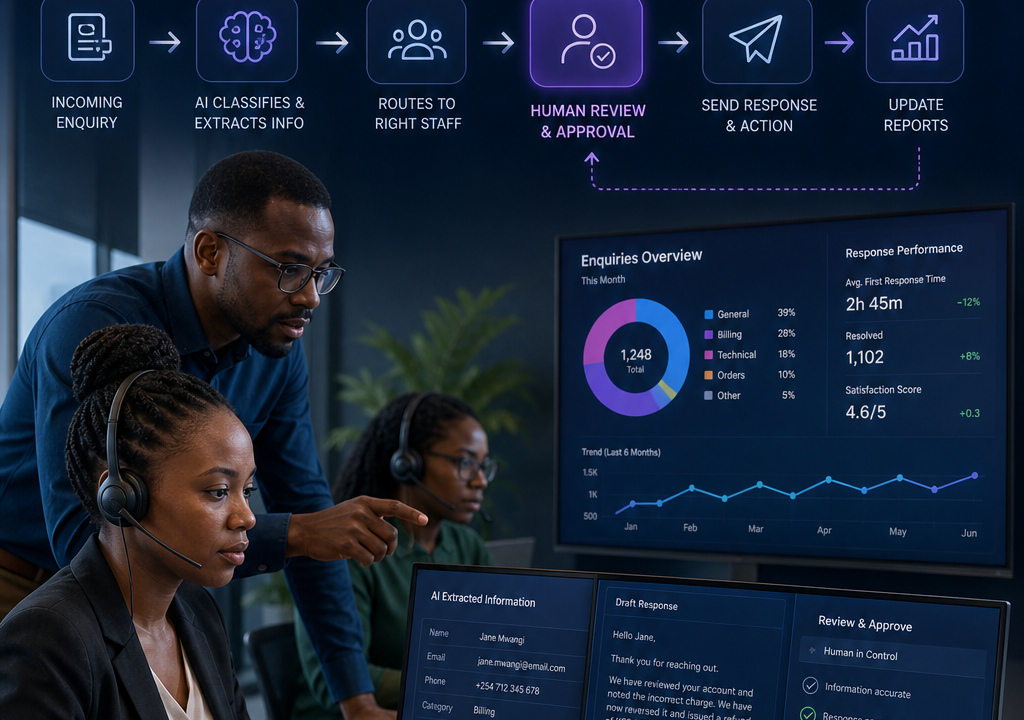
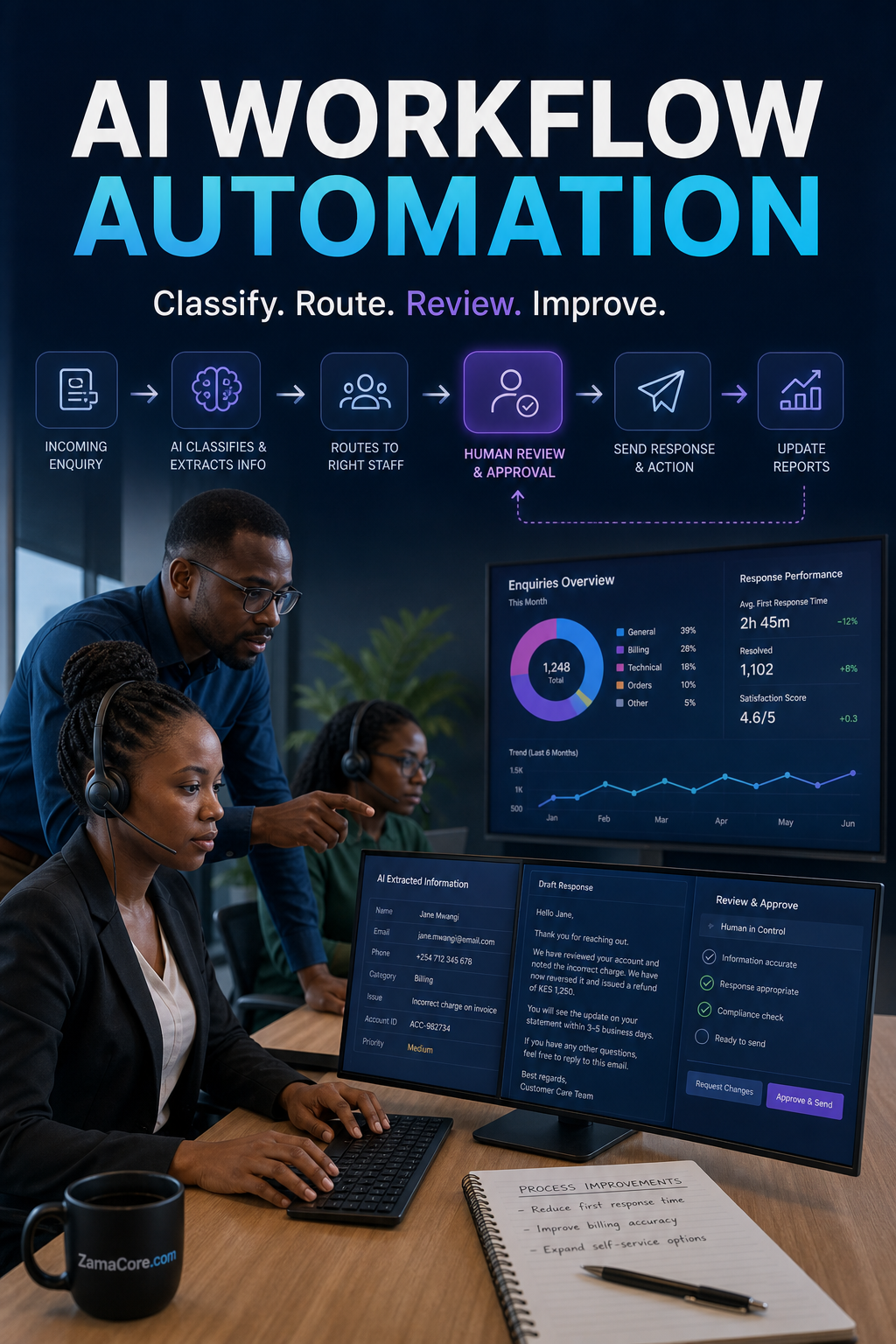
- Classify incoming enquiries and service requests
- Extract structured fields from standard documents
- Recommend the correct team, priority or workflow path
- Draft responses or summaries for human review
- Identify repeated exceptions and operational bottlenecks
These outcomes should be translated into measurable acceptance tests. Buyers can compare current turnaround time, missing records, repeated data entry, unresolved exceptions and time spent preparing reports against the same measures after implementation. This creates a stronger business case than choosing software only because it has a long feature list.
A practical implementation workflow
- Choose one repetitive, measurable and low-risk process
- Define approved data sources and prohibited information
- Set confidence thresholds and mandatory review points
- Log AI suggestions, human changes and final actions
- Test accuracy using representative cases
- Monitor errors, bias, privacy and business outcomes continuously
Implementation should be phased. The first release needs to make one important workflow reliable from beginning to end. Additional modules and automation can follow after users trust the core records. This approach reduces disruption and exposes unclear rules before they spread across the organization.
Records, roles and integrations
Before requesting a quotation, list the users who create, review, approve, complete and audit each record. Identify the information each person may view or change. Confirm retention, backup and export requirements. If the workflow depends on M-Pesa, accounting software, email, WhatsApp, an ecommerce platform, GPS services or another operational system, define what data must move between them and which platform remains the source of truth.
Integration should reduce repeated entry without hiding failures. A good design records when information was sent, whether it was accepted and what staff should do when a service is unavailable. Permissions should follow job responsibility, and important changes should produce an audit trail.
Common purchasing mistakes
- Allowing AI to approve financial or sensitive actions without review
- Sending confidential data to unapproved tools
- Treating generated text as verified fact
- Automating an unclear policy that staff interpret differently
Buyers should also avoid comparing proposals only by the initial price. Data preparation, configuration, integration, user training, support, hosting, security updates and future improvements influence the real cost. A credible proposal separates the first operational release from optional expansion.
Questions to ask during a demonstration
- Can you demonstrate our real process rather than a generic sample?
- How are exceptions, rejected requests and incomplete records handled?
- Which actions are recorded in the audit trail?
- How are permissions, backups and data exports managed?
- Which integrations are included and how are failures monitored?
- What training and support follow the first release?
- How will we measure adoption and operational improvement?
When customization is justified
Configuration is normally the first choice when the workflow is standard and the available platform can represent it cleanly. Custom development becomes justified when the organization has distinctive approvals, pricing rules, evidence, integrations, customer experiences or regulatory responsibilities that create real operational value. The goal is not customization for its own sake; it is a maintainable system that fits the work closely enough to be adopted.
Frequently asked questions
How long does implementation take?
Timing depends on scope, data readiness, integrations and decision speed. A focused first workflow can be delivered faster than a broad replacement of every existing tool. Ask for milestones, responsibilities and acceptance tests.
Should we replace all spreadsheets immediately?
No. Start with spreadsheets that cause repeated entry, weak control or delayed reporting. Keep temporary exports where they help transition, then retire them after the system proves reliable.
Can the system grow later?
It should support additional users, branches, workflow stages, reports and integrations without forcing a complete restart. Buyers should ask how future changes are governed and priced.
Next step
Discuss one controlled AI automation pilot with ZamaCore, including the data, review step and success measure.
Contact ZamaCore with a sample request, record or report and the steps people currently follow. That provides enough context for a focused demonstration and a realistic implementation plan.